Schneider 140CHS21000 Hot Standby Kit Installation Guide for Quantum PLC Redundancy
Time:2026-10-21 Browse: 0
Purpose of the Schneider 140CHS21000 Hot Standby Kit
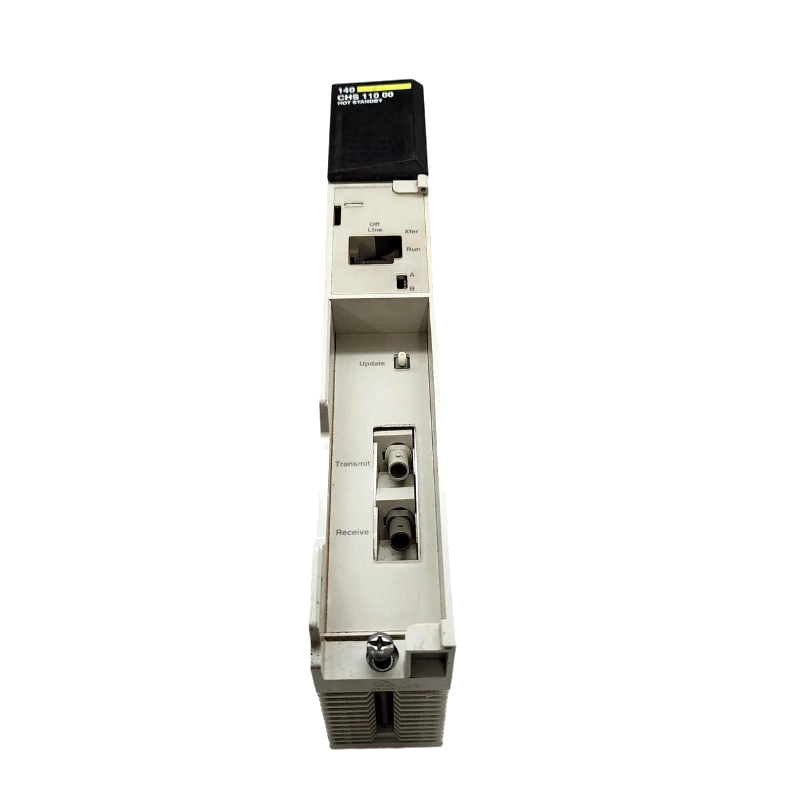
The Schneider Electric 140CHS21000 Hot Standby Kit enables a compatible Modicon Quantum PLC installation to implement redundant controller operation. Successful installation depends on correctly integrating the two 140CHS11000 Hot Standby Modules, connecting the duplex fiber-optic link, and configuring the controller software and remote I/O network. A physically complete kit does not guarantee redundancy unless both PLC systems can communicate and the standby controller reaches its required synchronized state.
What the 140CHS21000 Kit Contains
The Schneider 140CHS21000 is a system-level Hot Standby Kit rather than an individual PLC module. The documented kit contents include:
Two 140CHS11000 Hot Standby Modules.
One 3 m duplex fiber-optic cable, part number 990XCA65609.
One CHS downloadable function block.
One S908 connection kit, including the specified coaxial splitters and termination accessories.
One Quantum Hot Standby Planning and Installation Guide.
Verify the contents and part numbers against the original kit documentation before installation, particularly when working with legacy or previously used equipment.
Installation Planning for Schneider 140CHS21000 Redundant PLC Systems
The 140CHS21000 is intended for a compatible Quantum PLC architecture. Before mounting the equipment, check that the primary and standby racks have compatible CPUs, power supplies, rack configurations, and remote I/O interfaces.
Review the control program and determine how the application handles controller switchover. Processes that depend on communication timing, retained data, or remote I/O availability require particular attention.
Because this is a legacy product, confirm the compatibility of the installed Concept or ProWORX engineering environment, CHS software version, and controller firmware. Do not assume that a modern software installation supports every historical configuration.
Fiber-Optic Wiring and S908 Network Setup
The two 140CHS11000 modules communicate through the kit's duplex fiber-optic cable. Each fiber strand transmits in one direction, so the connections must follow the documented transmit-to-receive arrangement.
Check the following before energizing the system:
Connect each module's transmit port to the opposite module's receive port.
Inspect the fiber connectors for contamination, poor seating, or damage.
Install the specified S908 splitters and termination components according to the applicable remote I/O topology.
Confirm that the primary and standby controllers use the intended network configuration.
Verify that cable routing does not introduce excessive bending or mechanical strain.
An incorrectly crossed fiber link can leave the primary PLC operating without a functioning backup. This is why cable verification should precede replacement of either Hot Standby Module.
140CHS21000 Setup and Commissioning Procedure
Commissioning should establish a verified operating state rather than simply confirm that both racks power up.
First, install the two Hot Standby Modules and configure their A/B designations as required by the system documentation. Load or verify the CHS function block using a compatible engineering environment, then compare the controller configurations and remote I/O settings.
Start the designated primary controller and verify normal application execution. Start the second controller and inspect its status indicators and diagnostics to determine whether it has established the required standby state.
Record the Ready, Com Act, Primary, Com Err, and Standby indicators on both modules. Confirm that the active controller and standby controller report complementary roles and that no unresolved synchronization or communication errors remain.
Finally, perform an approved switchover test under controlled operating conditions. Verify that the application and remote I/O respond as intended before returning the equipment to production service.
Field Validation of the Schneider 140CHS21000 Installation
Consider a representative commissioning situation in which the primary Quantum PLC runs normally, but the standby rack remains offline. The first diagnostic action should be to establish whether the failure is associated with the fiber link, the controller configuration, or the remote I/O network.
If the module diagnostics indicate a communication problem, inspect the transmit/receive arrangement and the physical fiber connection. If communication is established but the standby state is still unavailable, compare the controller configurations, software revisions, and A/B settings.
This example illustrates an engineering diagnostic method rather than a documented customer incident. Actual commissioning acceptance criteria must be based on observed system behavior and the manufacturer's instructions.
Long-Tail Keywords for 140CHS21000 Installation
This Installation Guide covers Schneider 140CHS21000 Hot Standby Kit installation, Modicon Quantum PLC redundancy setup, 140CHS11000 module integration, Quantum Hot Standby Setup / Commissioning, S908 remote I/O network configuration, and redundant PLC synchronization validation.
The installation is complete only when the primary controller operates normally, the standby controller is synchronized, and a controlled switchover test confirms the expected redundancy behavior.